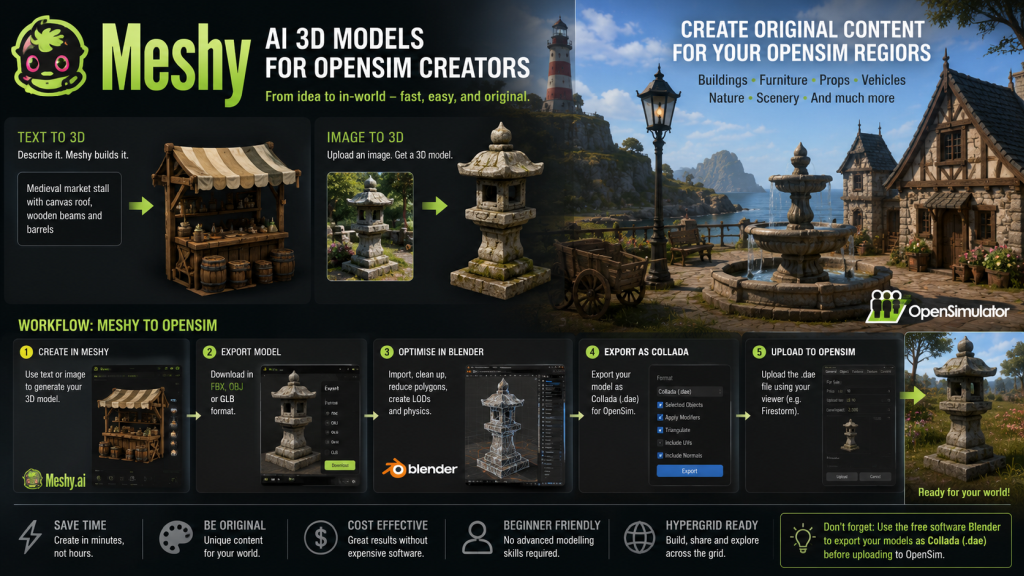
Creating high-quality 3D content has traditionally required experience with professional modelling software such as Blender, Maya or 3ds Max. While these applications remain the preferred choice for experienced creators, they also come with a steep learning curve that can discourage newcomers. Meshy aims to change that by using artificial intelligence to generate detailed 3D models in minutes from either a simple text description or a reference image.
Rather than spending hours modelling an object by hand, users can describe what they want using everyday language. For example, entering prompts such as “medieval stone fountain”, “modern leather sofa”, “wooden fishing boat” or “fantasy castle tower” allows Meshy to generate fully textured 3D models that can then be refined, downloaded and imported into other applications. The platform can also generate models from photographs or concept artwork, making it useful for recreating real-world objects or developing virtual environments.
One of Meshy’s greatest strengths is the speed at which ideas can be turned into usable assets. What might previously have taken several hours or even days to model can often be produced in a matter of minutes. This makes it particularly attractive for hobbyists, educators and independent virtual world creators who need a large variety of objects without investing months learning complex 3D modelling techniques.
For OpenSim users, Meshy offers an exciting opportunity to create original content for regions and entire grids. Buildings, furniture, vehicles, statues, decorative objects, landscaping features and countless other items can be generated before being imported into Blender for optimisation. Because OpenSim, like Second Life, performs best with efficient mesh, most AI-generated models benefit from some additional work before they are uploaded. This typically includes reducing polygon counts, cleaning the mesh, simplifying materials and creating appropriate Levels of Detail (LODs) to ensure objects render efficiently while minimising viewer lag.
Many creators choose to use Meshy as the first stage of the creative process rather than the final step. After generating a model, it can be exported in common formats such as FBX, OBJ or GLB before being edited in Blender. Here, textures can be refined, unnecessary geometry removed and physics shapes created before uploading the finished asset into OpenSim using the standard mesh upload tools available in viewers such as Firestorm.
The platform is equally useful for region designers who need large quantities of scenery. Forest props, rocks, fences, ruins, market stalls, street furniture and architectural features can all be produced rapidly, allowing builders to concentrate on creating immersive environments rather than modelling every individual object from scratch. Combined with traditional terrain editing and texture work, Meshy can significantly reduce the time required to complete an entire region.
Meshy can also generate PBR-ready textures for supported workflows, producing materials that include colour, normal and roughness maps. While OpenSim’s support for physically based rendering continues to evolve depending upon the version of OpenSimulator and the viewer being used, these texture maps can still provide a useful starting point for creating realistic-looking objects.
Although AI-generated models are impressive, they are not always perfect. Some objects may contain excessive polygon counts, distorted geometry or unnecessary detail that needs correcting before use in a real-time virtual environment. For this reason, creators should expect to spend some time optimising their models if they intend to use them extensively within OpenSim.
Another important consideration is licensing. Meshy provides different subscription plans, and users should always check the current licence terms to ensure they understand how generated models may be used, particularly for commercial projects or content intended for resale within virtual worlds.
For many OpenSim builders, Meshy represents an exciting addition to the creative toolbox rather than a replacement for traditional modelling software. It removes many of the barriers associated with creating original mesh while allowing experienced creators to refine and personalise the results using applications such as Blender. As AI-assisted modelling continues to improve, platforms like Meshy are likely to become increasingly important for virtual world development, enabling creators of all skill levels to build richer, more detailed environments in a fraction of the time previously required.
Whether you are furnishing a home, building a medieval village, designing a futuristic city or creating an entire landscape, Meshy provides a fast and accessible way to transform ideas into 3D assets that can help bring your OpenSim regions to life.
Note: One important step for OpenSim creators is converting the finished model into the Collada (.dae) format used for mesh uploads. While Meshy can export in formats such as FBX, OBJ and GLB, these files must first be imported into the free and open-source 3D modelling application Blender. From there, creators can optimise the mesh, reduce polygon counts where necessary, generate appropriate Levels of Detail (LODs), create a physics shape if required, and finally export the model as a Collada (.dae) file. This file can then be uploaded into OpenSim using viewers such as Firestorm. Although it adds an extra step to the workflow, Blender is an invaluable tool for ensuring AI-generated models perform efficiently and look their best in a virtual world.












Leave a Reply